DTF prepress software · updated July 2026
What is DTF prepress software — and who actually needs it?
A category explainer written from the operator’s bench: what the prepress layer does in a DTF workflow, where it ends, and how to tell it apart from the builders, editors and RIPs around it.
The map
Where prepress sits in a DTF workflow.
A DTF job crosses four layers on its way to film. Design happens in an editor — Photoshop, Illustrator, Affinity, Canva. Intake happens wherever orders arrive: a storefront gang-sheet builder if customers compose their own sheets, or plain email-and-folders if the shop prints its own work. Prepress happens operator-side: everything between “I have the artwork” and “the RIP has a file it can print”. Printing happens in the RIP, which screens the inks and drives the printer.
Prepress is the least visible layer of the four and the one that eats the most operator time when done by hand — laying out sheets in an editor, painting white plates, renaming channels. That hand-work is what this category of software automates.
The job list
What DTF prepress software actually does.
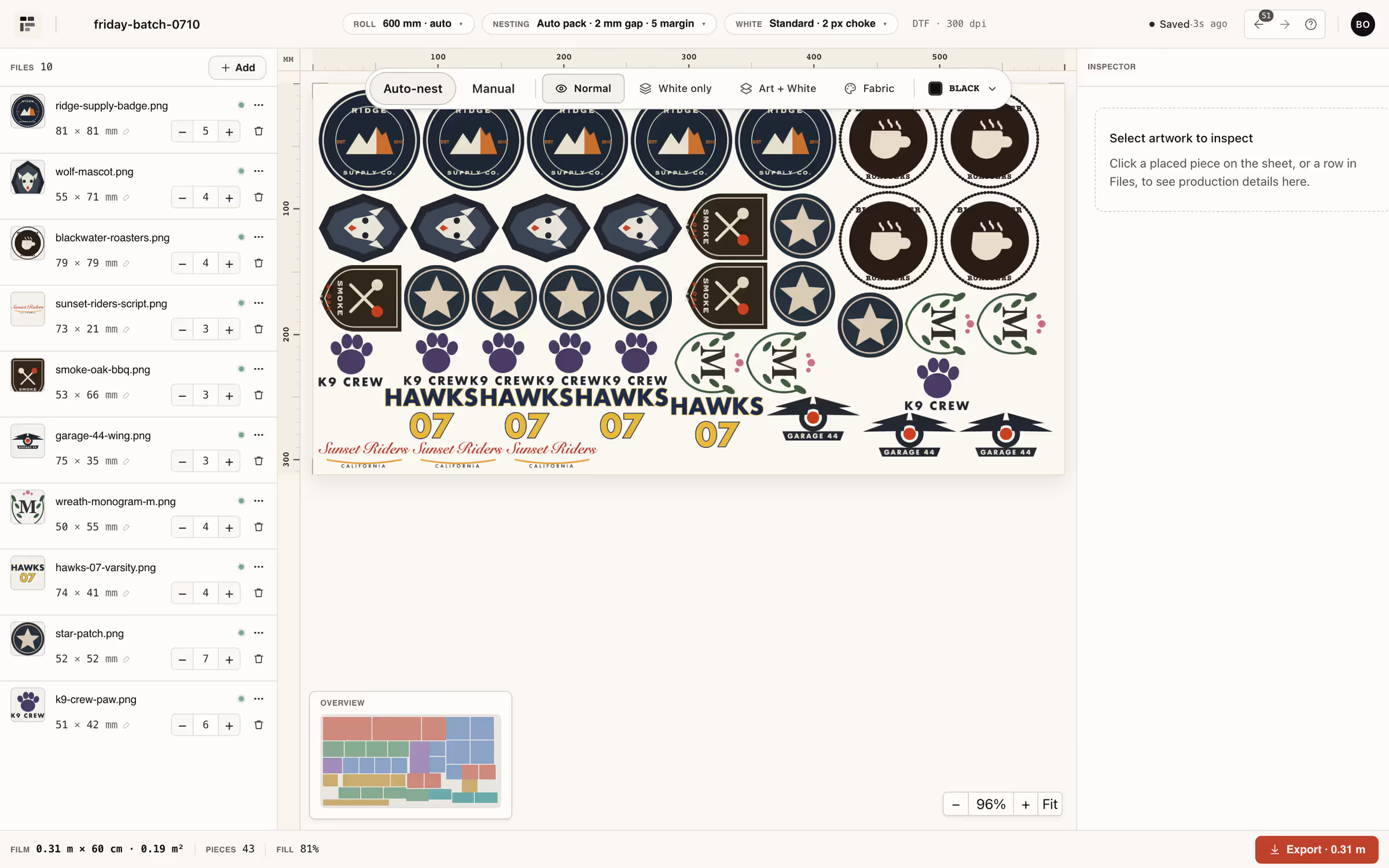
- Gang-sheet nesting. Packs many jobs onto roll film so you buy less of it. In NestSheet: an auto-nesting engine with 0/90° rotation and gap/margin control — how the nesting works.
- White underbase. Derives the white plate from artwork alpha and chokes it inward so it never peeks past the colour. In NestSheet: choke 0–10 px (default 2), threshold, soft-hand and halftone modes — the white page.
- File repair. Client files arrive broken: invisible pixels left by background removal, iPhone’s fake 72 dpi, colour fringes. Prepress fixes them before they cost film — in NestSheet, the Inspector tools plus DPI checks at upload.
- RIP-ready export. Writes files the RIP opens first try: spot channels named the way the RIP expects (W1–W8 / V1–V4 here), formats from flat PNG to a 12-channel DTF TIFF — the export matrix.
- Colour normalisation. CMYK masters are normalised to a predictable working space using their embedded ICC profile at upload, so what you nest is what you print.
Who needs it
Who needs prepress software — and who doesn’t.
- In-house print shops. You run the printer daily and gang sheets are the bottleneck between orders and film. This is the core case — the in-house page.
- Transfer wholesalers. At volume, film utilisation is a line item, not a rounding error — layout quality compounds.
- Marketplace sellers who print themselves. Etsy doesn’t allow embedded builders; sellers who print in-house need the prepress, not the widget — the Etsy page.
- Who doesn’t need it: if a supplier prints your transfers, their builder already does this job for you. And if you need customers to compose sheets in your own store, you need an intake widget — a different category that works upstream of prepress, not instead of it.
Where NestSheet sits
One prepress layer in the category — here’s ours.
NestSheet is a DTF prepress layer that runs in the browser: auto-nesting, white underbase with choke, Inspector file repair, and export with six RIP presets in the box — MainTOP, CadLink Digital Factory, AcroRip, PhotoPRINT, SAi Flexi and Generic DTF. The free tier (30 m² a month, no card) exists so you can evaluate the category on your own order folder instead of a demo reel.
It is not the only operator-side tool in the category, and the category is bigger than any one product. Our comparison pages put the alternatives side by side — dated, sourced, and including where each one is genuinely better.
Side by side
The four layers, told apart.
The quickest way to know which tool you’re shopping for.
| Layer | Who drives it | What it does | What it doesn’t do |
|---|---|---|---|
| Design editor | The designer | Draws and edits the artwork itself | Doesn’t nest sheets, prep white plates or talk to RIPs |
| Gang-sheet builder (storefront) | The shop’s customers | Order intake: customers compose and buy their own sheets | Not an operator tool — white, file repair and RIP-specific export still happen downstream |
| DTF prepress software | The press operator | Nesting, white underbase, file repair, spot-channel export | Doesn’t screen inks or drive the printer — it works before the RIP |
| RIP | The press operator | Ink screening, colour management, printer control | Doesn’t repair client files; built-in nesting is basic — the comparison |
FAQ
The questions operators actually search.
What is a gang sheet?
Should DTF files be RGB or CMYK?
Is there free DTF RIP software?
Does Canva free export transparent PNGs?
Keep going